PDF Run this chapter's code LaTeX source Comments
Chapter 2SageMath Basics for Post-Quantum Cryptography
2.1Why this chapter matters#
This chapter is not meant to teach SageMath in isolation. Its purpose is to build a small experimental laboratory for post-quantum cryptography. Later chapters on LWE, RLWE, Kyber, Dilithium, McEliece, and lattice attacks all depend on the objects introduced here.
2.2Learning goals#
After finishing this chapter, you should be able to:
create integers, rationals, reals, complex numbers, finite fields, vectors, matrices, and polynomials in SageMath;
distinguish Sage objects from ordinary Python values;
express algebraic structures such as \(\mathbb{F}_q\), \(R_q = \mathbb{Z}_q[x]/(f(x))\), and \(Ax=b\) in Sage;
run small experiments that foreshadow later cryptographic constructions.
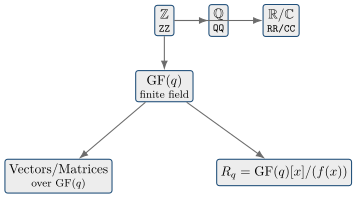
Every algebraic object used later in the book is a specialization of a small handful of number systems. Figure 2.1 lays out that map before we start building each piece in Sage.
2.3Installing SageMath#
2.3.1Option 0: install nothing#
Every code listing in this book runs in a browser at appliedpqc.io/playground.html, on the free SageMath Cell service. Nothing is installed, and each listing arrives with the earlier listings of its chapter already run, so any snippet can be tried on its own. The one thing a browser cannot do is the slowest work — Falcon key generation, and signing under the SLH-DSA s parameter sets — which needs a local Sage.
2.3.2Option 1: conda-forge#
The quickest local install on any platform, and the one that gives the newest release:
conda create -n sage -c conda-forge sage
conda activate sage
The package is named sage. Note there is no sagemath-standard package on conda-forge, despite the name appearing in some older instructions.
2.3.3Option 2: Docker#
To keep the host clean, start SageMath from a container:
docker run -it sagemath/sagemath sageOnce the shell starts, you can enter Sage commands directly. To run a script rather than work interactively, override the image’s entry point, and mount a writable directory — Sage writes a preparsed .sage.py beside each source file:
docker run --rm --entrypoint bash -v "$PWD:/home/sage/work" \
-w /home/sage/work sagemath/sagemath:10.9 -lc 'sage myscript.sage'2.3.4Option 3: system packages#
On Debian and Ubuntu:
sudo apt install sagemathOn macOS, SageMath is distributed as a cask rather than a formula:
brew install --cask sageOn Windows, install WSL2 and then use conda-forge or apt inside the Linux environment. Debian and Ubuntu currently ship Sage 9.5, some way behind conda-forge; everything in this book works on 9.5 or newer.
2.3.5Notebook workflow#
For experiments and exploratory work, a notebook interface is often most convenient:
sage -n jupyterThen open the displayed local URL in a browser.
2.4SageMath and Python#
SageMath is built on top of Python, but it adds richer mathematical types and objects. A plain Python integer and a Sage integer are not the same thing.
a = 3
b = 4
a + b
In Python, the result is an ordinary integer. In Sage, the corresponding object may carry algebraic meaning.
a = Integer(3)
b = Integer(4)
a + b
To inspect the type, use:
type(a)This matters in cryptography because the symbol \(3\) may represent an ordinary integer in one context, but a field element in another. For example, \(3 \in \mathrm{GF}(7)\) is not the same object as the integer \(3\) in \(\mathbb{Z}\).
2.5Basic number systems#
SageMath provides several standard number domains that are useful in later cryptographic work.
2.5.1Integers \(\mathbb{Z}\)#
The integer ring is available as ZZ.
ZZYou can create integers explicitly:
a = ZZ(10)
a
Basic arithmetic works as expected:
a = ZZ(10)
b = ZZ(3)
a + b
Division behaves more carefully than in Python because Sage keeps symbolic and exact arithmetic whenever possible:
10/3The result is the rational number \(\frac{10}{3}\). Integer division is available through:
10//3and modular arithmetic through:
10 % 32.5.2Rationals \(\mathbb{Q}\)#
The rational field is QQ.
a = QQ(1)/3
a
This is useful because many lattice algorithms, such as LLL and Gram–Schmidt-style computations, work naturally over rational numbers.
2.5.3Reals \(\mathbb{R}\) and complexes \(\mathbb{C}\)#
SageMath also supports real and complex domains.
RR
CC
For example:
sqrt(2)
RR(sqrt(2))
CC(1 + 2*I)
These domains become relevant later when discussing numerical methods, Fourier-style transforms, and related implementation ideas.
2.6Finite fields#
Finite fields are among the most important structures in modern cryptography. A finite field is usually written as \(\mathrm{GF}(q)\) or \(\mathbb{F}_q\). Before computing with them, we define them precisely; they underlie every construction in this book.
Definition 2.1 (Field). A field is a set \(\mathbb{F}\) with addition and multiplication such that \((\mathbb{F},+)\) and \((\mathbb{F}\setminus\{0\},\cdot)\) are both abelian groups (with identities \(0\) and \(1\)) and multiplication distributes over addition. Concretely: one can add, subtract, multiply, and divide by anything nonzero.
A finite field is simply a field with finitely many elements. Their existence is completely classified.
Theorem 2.2 (Classification of finite fields). A finite field of order \(q\) exists if and only if \(q=p^m\) is a power of a prime \(p\), and it is then unique up to isomorphism, denoted \(\mathbb{F}_q\) or \(\mathrm{GF}(q)\). When \(m=1\) it is simply the integers modulo \(p\), \[\mathbb{F}_p = \mathbb{Z}/p\mathbb{Z} = \{0,1,\dots,p-1\},\] with arithmetic reduced modulo \(p\).
Almost every modulus in this book is prime, so the working picture is the clean one: \(\mathbb{F}_q\) is “clock arithmetic” modulo \(q\) in which division is also available. This field structure makes tools such as Gaussian elimination available when they are needed. It is not, however, why ML-KEM or ML-DSA key generation works: those algorithms sample secrets and public values rather than solving a random linear system. Their prime moduli are chosen for several interacting reasons, including algebraic structure, NTT compatibility, noise distributions, correctness, security, and implementation efficiency.
2.6.1Creating a finite field#
For example, the field with seven elements is:
F = GF(7)
F
Elements are created by coercing values into the field:
a = F(3)
a
Arithmetic is performed modulo the prime:
a = F(6)
a + F(3)
The result is \(2\), because \(6 + 3 = 9 \equiv 2 \pmod{7}\).
2.6.2Inverses#
In cryptography, inverses appear constantly. For a field element \(a\), the inverse \(a^{-1}\) satisfies \(a a^{-1} = 1\).
a = F(3)
a.inverse()
Since \(3 \cdot 5 = 15 \equiv 1 \pmod{7}\), the inverse is \(5\).
Under the hood, a.inverse() does not search through all field elements; it runs the extended Euclidean algorithm, which computes \(\gcd(a,q)\) while simultaneously tracking the coefficients of a Bézout identity \(as+tq=\gcd(a,q)\), so that when \(\gcd(a,q)=1\) the coefficient \(s\) is exactly \(a^{-1} \bmod q\).
2.7Linear algebra over a finite field#
Finite-field linear algebra is the starting point for many lattice-based constructions.
F = GF(7)
A = Matrix(F, [[1, 2], [3, 4]])
A
The inverse can be computed as:
A.inverse()and one can verify the identity matrix:
A * A.inverse()This is the algebraic setting behind equations such as \(A s + e = b\), which will appear later in the study of LWE.
2.8Vectors and matrices#
Vectors are convenient for representing secret values and noise terms.
v = vector(F, [1, 2])
v
Matrix-vector multiplication is then straightforward:
A * vThe output is (5, 4). The vector has length \(2\), matching the two columns of \(A\); dimensions must agree for matrix–vector multiplication.
2.9Polynomial rings#
Polynomial rings are essential for the ring-based versions of lattice problems, especially RLWE and related constructions.
2.9.1Building a polynomial ring#
F = GF(7)
R.<x> = PolynomialRing(F)
Now \(x\) is a formal variable in the ring.
f = x^3 + 2*x + 1
f
Addition and multiplication are performed in the usual algebraic way:
f + f
f * f2.9.2Quotient rings#
A quotient ring is created by imposing a polynomial relation. For example:
S.<x> = QuotientRing(R, R.ideal(x^3 + 1))In this quotient, the relation \(x^3 = -1\) holds. This idea is closely related to the ring structure used in Kyber, where one often works in a ring of the form
\[R_q = \mathbb{Z}_q[x]/(x^{256}+1).\]
2.10A first cryptographic experiment#
As a first experiment, we can verify the behavior of modular inverses.
F = GF(17)
for i in range(1, 17):
    a = F(i)
    print(i, a.inverse() * a)
Every value should evaluate to \(1\) in the field.
2.11A first LWE-style example#
To foreshadow later chapters, we can create a simple linear system over a finite field:
q = 17
F = GF(q)
A = random_matrix(F, 3, 3)
s = random_vector(F, 3)
b = A * s
A
s
b
This is the basic algebraic shape behind LWE before noise is introduced.
2.12Exercises#
Try to solve the following exercises on your own.
Create \(\mathrm{GF}(13)\) and compute the inverse of every nonzero element.
Create \(R = \mathrm{GF}(17)[x]\) and compute \((x^2 + 3x + 1)^2\).
Create \(\mathrm{GF}(17)[x]/(x^4 + 1)\) and verify that \(x^4 = -1\).
Repeatedly sample \(A \in \mathrm{GF}(17)^{4 \times 4}\) until
A.is_invertible()is true, then verify that \(A^{-1}A = I\). What happens for a singular sample?
2.13Connection to the next chapters#
The next chapter, Linear Algebra Foundations, will deepen the linear-algebra viewpoint needed for lattice problems. After that, the polynomial viewpoint will be developed more fully in Polynomial Rings. These two chapters prepare the ground for LWE, RLWE, and ultimately Kyber and Dilithium.
Comments